 HeroBytes
Know who owes you, how much, and for how long.
Invoices, payments and clients in one workbook, turned into an aging report: current, 1-30, 31-60, 61-90 and 90+ days overdue. It lists the five invoices to chase first, prints a statement for any client, and reminds you when a follow-up is due.
Launch offer: 30% off with code LAUNCH30 until November 10, 2026. One-time payment, instant download. Secure checkout by Polar.
What an aging report tells you
The one table that shows where your cash is stuck.
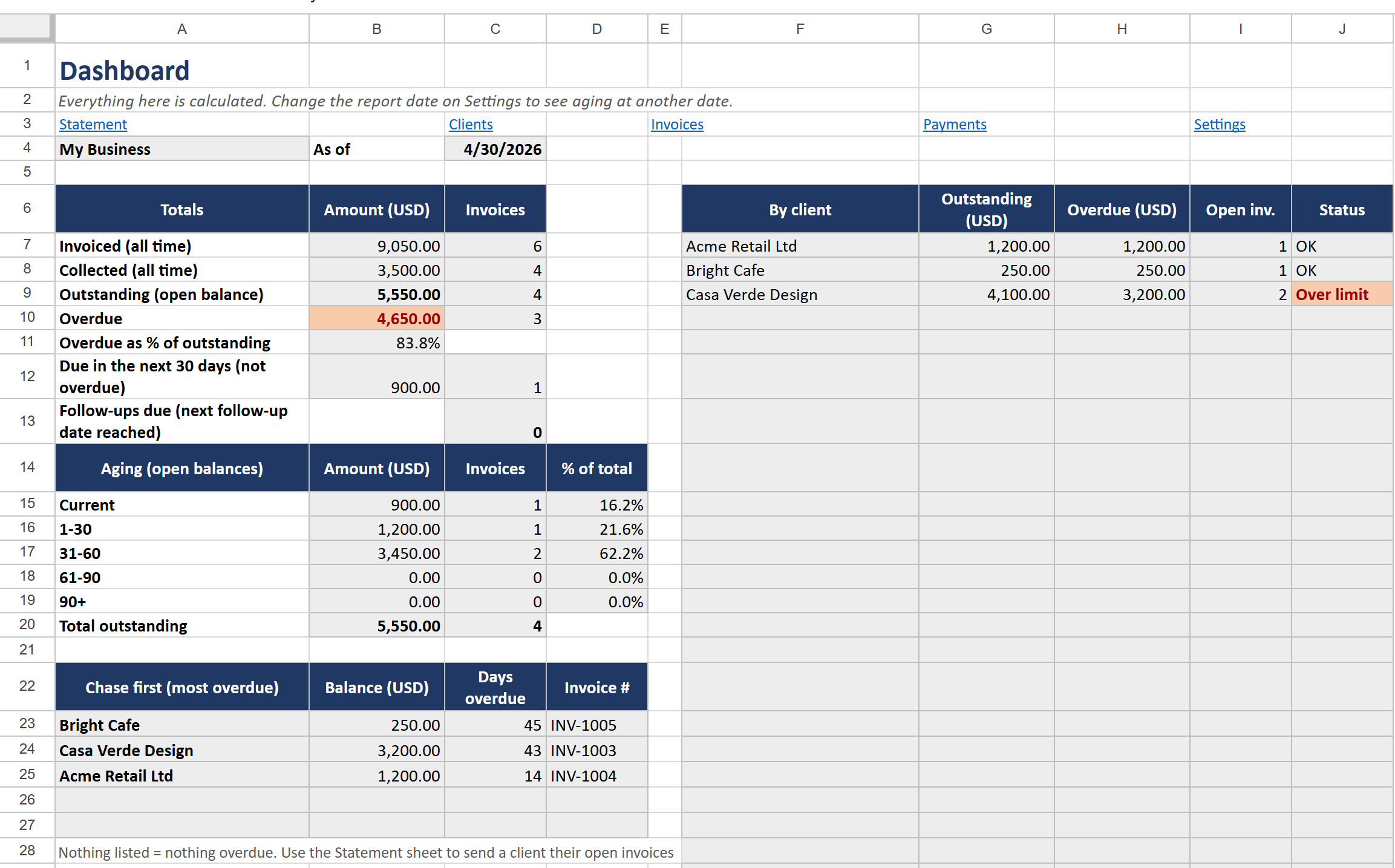
An accounts receivable aging report groups every unpaid invoice by how late it is. Money in "current" is fine. Money in "31-60" needs a reminder. Money in "90+" is the money you may never see. Small businesses and freelancers usually keep this in their head or in the invoicing tool; this template keeps it in one spreadsheet you control, and recalculates it for any date you choose.
- Settings: your business name, currency code, default payment terms (for example 30 days) and the report date. Leave the report date empty to always see today.
- Clients: one row per client, with their payment terms and an optional credit limit.
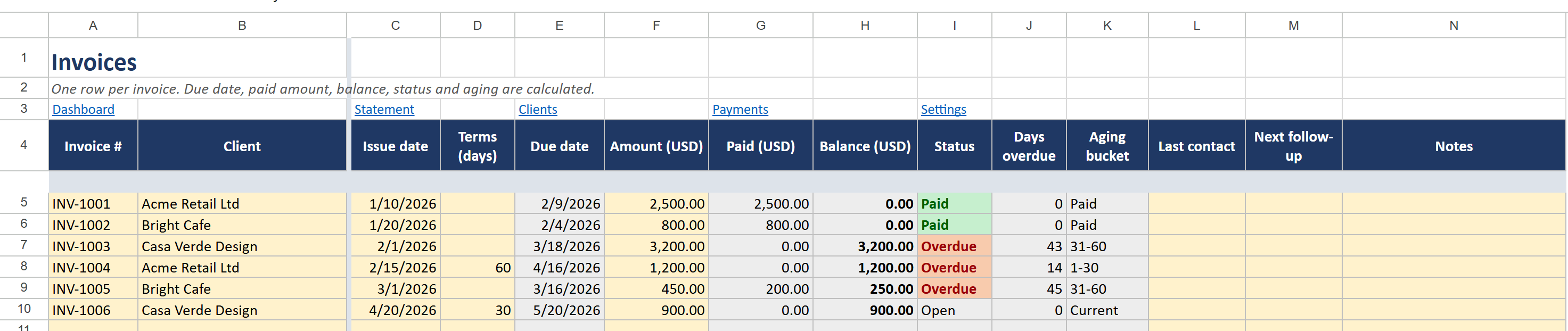
- Invoices: one row per invoice: number, client, issue date and amount. The due date, paid amount, balance, status, days overdue and aging bucket are calculated.
- Payments: one row per payment with the invoice number. Partial payments are fine; a check warns you if the invoice number does not exist.
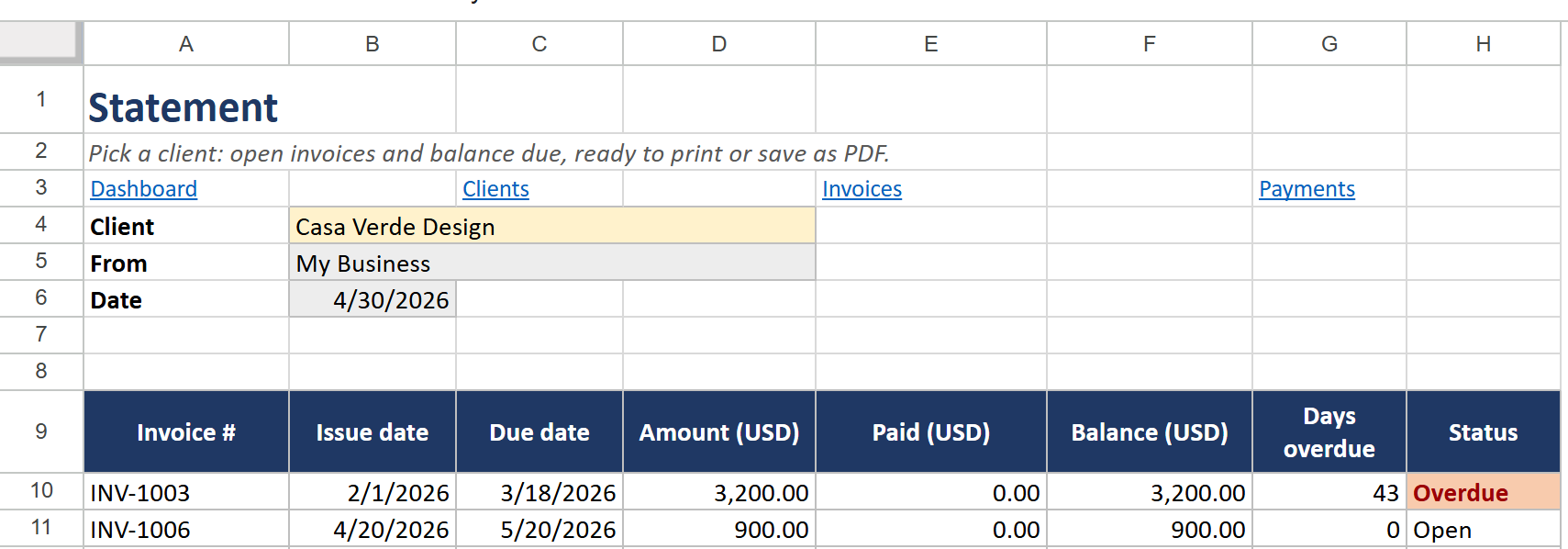
- Dashboard and Statement: the Dashboard shows the totals, an aging chart and the five most overdue invoices to chase first. On Statement, pick a client to get their open invoices and balance due, ready to print or save as PDF and send.
Can I do this with a blank spreadsheet?
Yes: a payments total per invoice with SUMIF, a due date from the invoice or client terms, days overdue against the report date, and a COUNTIFS and SUMIFS per bucket. The hard parts are partial payments, terms that come from three places, and formulas that do not break in Excel with another language or decimal comma. The template has all of that done and tested in Excel and Google Sheets.
Free Lite version or full tracker
Start with the Lite version. Upgrade when you want the aging report.
| Lite (free) | Full ($9.99) | |
|---|---|---|
| Invoices with balance, status, days overdue | 100 rows | 500 rows |
| Totals: invoiced, collected, outstanding, overdue | Yes | Yes, plus % overdue and due in the next 30 days |
| Aging buckets (current to 90+) | - | Yes, for any report date |
| Payments sheet with partial payments | Paid amount typed on the invoice | 1,000 payment rows matched to invoices |
| Clients with terms and credit limits | - | 50 clients, Over limit flag |
| Per-client summary | - | Yes |
| Chase-first list (5 most overdue invoices) | - | Yes |
| Client statement, ready to print or send | - | Yes |
| Follow-up dates with reminders | - | Last contact and next follow-up per invoice |
| Aging chart | - | Yes |
| Overdue in red, paid in green | Yes | Yes |
| Google Sheets copy link | Open the .xlsx in Sheets | One click, ready to use |
Questions
Which Excel versions does it work in?
Microsoft Excel 2010 or newer, on Windows and Mac, in any language and with a decimal point or a decimal comma.
Does it work in Google Sheets?
Yes. The download includes a PDF with a link that makes your own copy in Google Sheets in one click.
Does it create or send invoices?
No. It tracks the invoices you already issue with your invoicing tool or accountant, and tells you what is owed and how late.
What do I receive?
A ZIP with two .xlsx files (one with example clients, invoices and payments, one blank) and a PDF with instructions and a Google Sheets copy link for each, right after payment.
Can I use it for several businesses?
The licence covers one business. Please do not share or resell the file.
Support
Questions or a problem with the file? Write to sebas152000@gmail.com and you will get an answer within one business day. More templates: all HeroBytes templates.