 HeroBytes
Budget the way you get paid: paycheck by paycheck.
Most budget spreadsheets assume one paycheck a month. Pick how often you are paid (weekly, every two weeks, twice a month or monthly) and the planner works out your real paydays, so you see what each paycheck has to cover, what is already spent and what is left before the next one. Even in the months with three biweekly paychecks.
Launch offer: 30% off with code LAUNCH30 until November 10, 2026. One-time payment, instant download. Secure checkout by Polar.
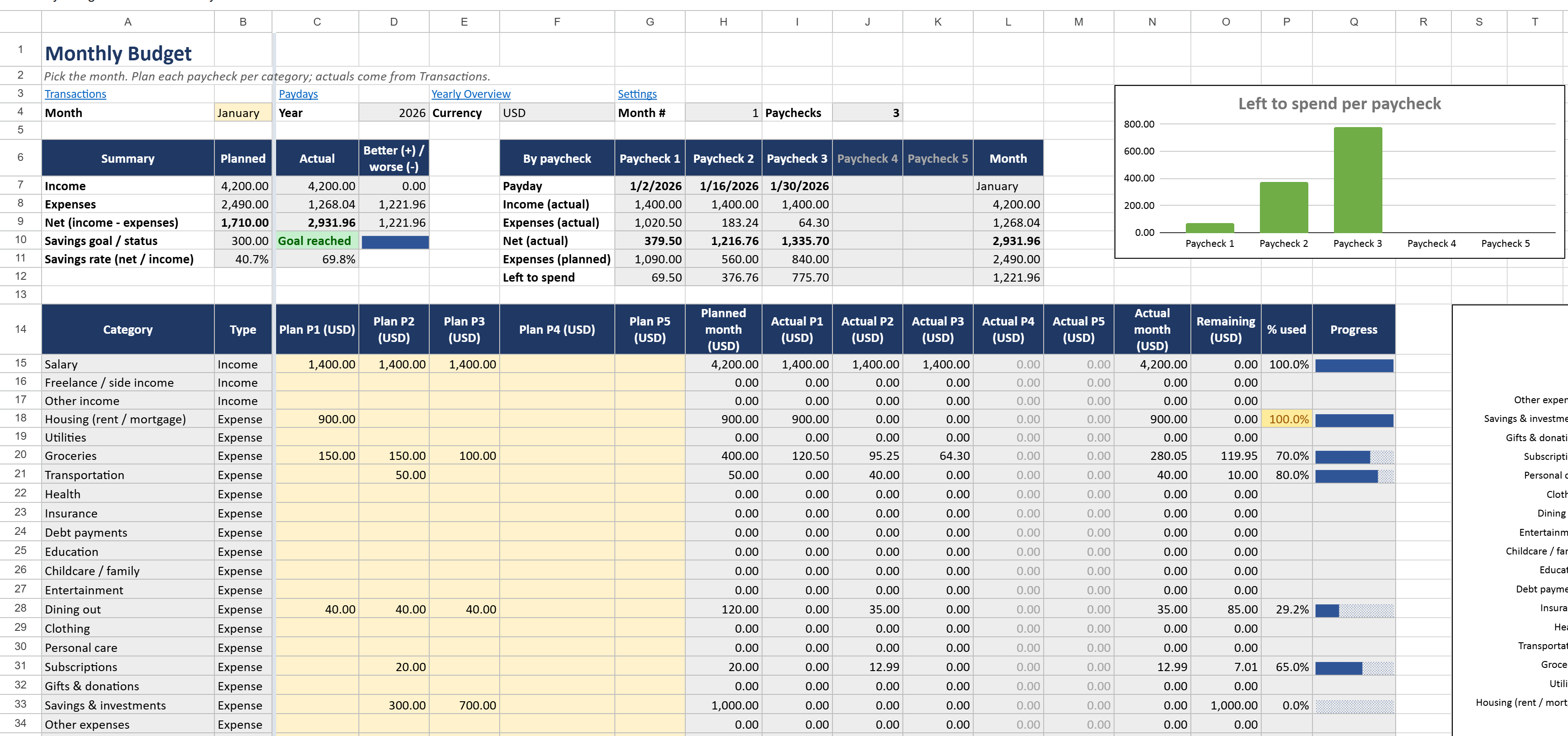
How a biweekly budget works
Paid every two weeks? On the 1st and the 15th? Every Friday? This is for you.
When your income arrives in two parts, a monthly budget hides the real problem: rent leaves with the first paycheck, and the second one has to carry groceries, transport and everything else. A paycheck budget plans each paycheck on its own, so you know before spending whether it adds up. And if you are paid every two weeks, two months a year bring a third paycheck: the planner shows it, so you can decide what it goes to.
- Settings: type your currency code (USD, EUR, MXN, COP...) and the year, pick how often you are paid and type one real payday. The Paydays sheet lists every payday of the year for you.
- Monthly Budget: pick the month and type what you plan to earn and spend per category, for each paycheck of that month (up to five when you are paid weekly).
- Transactions: every time money comes in or goes out, add a row with the date, a category from the list, the amount and how you paid.
- The sheet does the rest: each transaction lands on the paycheck that pays for it, then you get actual vs planned per category and per paycheck, what is left to spend from each paycheck, your savings rate and whether you hit your savings goal. A progress bar fills in per category and turns red when a category goes over plan.
Can I do this with a blank spreadsheet?
Yes. You need a list of paydays, a lookup that finds the paycheck each transaction belongs to, a SUMIFS per category and paycheck, a plan column per paycheck and a few totals. It takes an evening to build and a few more to get the edge cases right: months with three paychecks, a December paycheck that pays for January, categories you add later, formulas that keep working in Excel with a decimal comma. The template is that evening, already tested in Excel and Google Sheets in English and Spanish.
Free Lite version or full planner
Start with the Lite version. Upgrade if you want a plan for each paycheck.
| Lite (free) | Full ($7.99) | |
|---|---|---|
| Plan vs actual per category | Whole month | Per paycheck (weekly, every two weeks, twice a month or monthly) and whole month |
| Categories | 10 | 20 ready, add as many as you need |
| Transactions | 100 rows, one month | 500 rows, any month of the year |
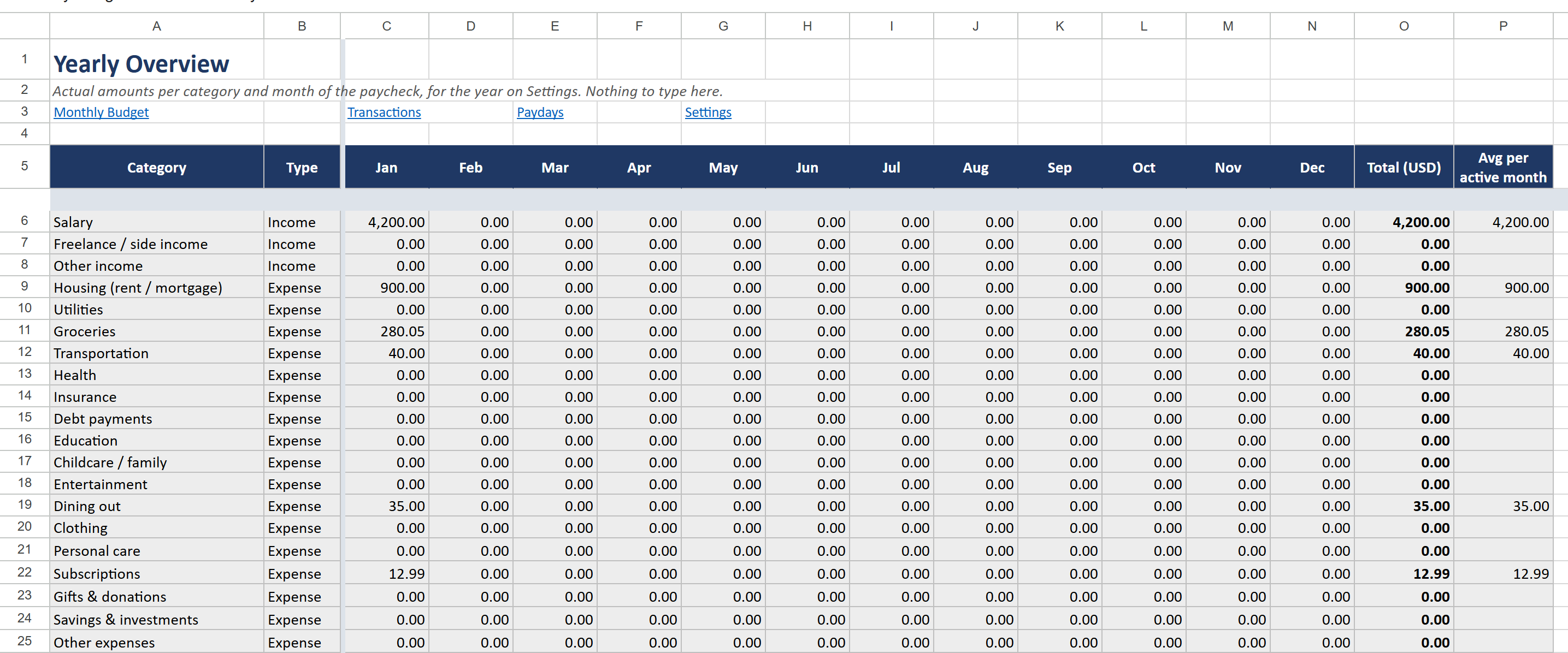
| Yearly Overview | - | 12 months side by side, totals, net |
| Savings goal and savings rate | - | Yes, with a progress bar |
| Charts | - | Planned vs actual, income vs expenses per month, cumulative savings |
| Progress bar per category, colors when over plan | Yes | Yes |
| Files | One file with examples | With examples and blank, plus two Google Sheets copies |
| Google Sheets copy link | Open the .xlsx in Sheets | One click, ready to use |
| Any currency, no macros | Yes | Yes |
Questions
Which Excel versions does it work in?
Microsoft Excel 2010 or newer, on Windows and Mac. The formulas adapt to your language and regional settings, so it works the same with a decimal point (1,500.00) or a decimal comma (1.500,00).
Does it work in Google Sheets?
Yes. The download includes a PDF with a link that makes your own copy in Google Sheets in one click. You can also upload the .xlsx to Google Drive and open it there.
I get paid every two weeks. Does it handle months with three paychecks?
Yes. Pick "Every 2 weeks" on Settings and type one real payday: the planner lists all your paydays, and a month with three paychecks shows three columns to plan. Each transaction counts for the last paycheck on or before its date, so spending on January 31 with a January 30 paycheck goes to that paycheck.
I get paid on the 1st and the 15th, or once a month.
Pick "Twice a month" (and the day the first period ends, 15 by default) or "Monthly" on Settings. You can change it any time; the whole planner follows.
What do I receive?
A ZIP with two .xlsx files (one with example rows so you see it working, one blank to start clean) and a PDF with instructions and a Google Sheets copy link for each, available right after payment.
Can I share it or resell it?
The licence is for personal use: please do not share or resell the file.
Support
Questions or a problem with the file? Write to sebas152000@gmail.com and you will get an answer within one business day. More templates: all HeroBytes templates.