 HeroBytes
See the month you will be debt free.
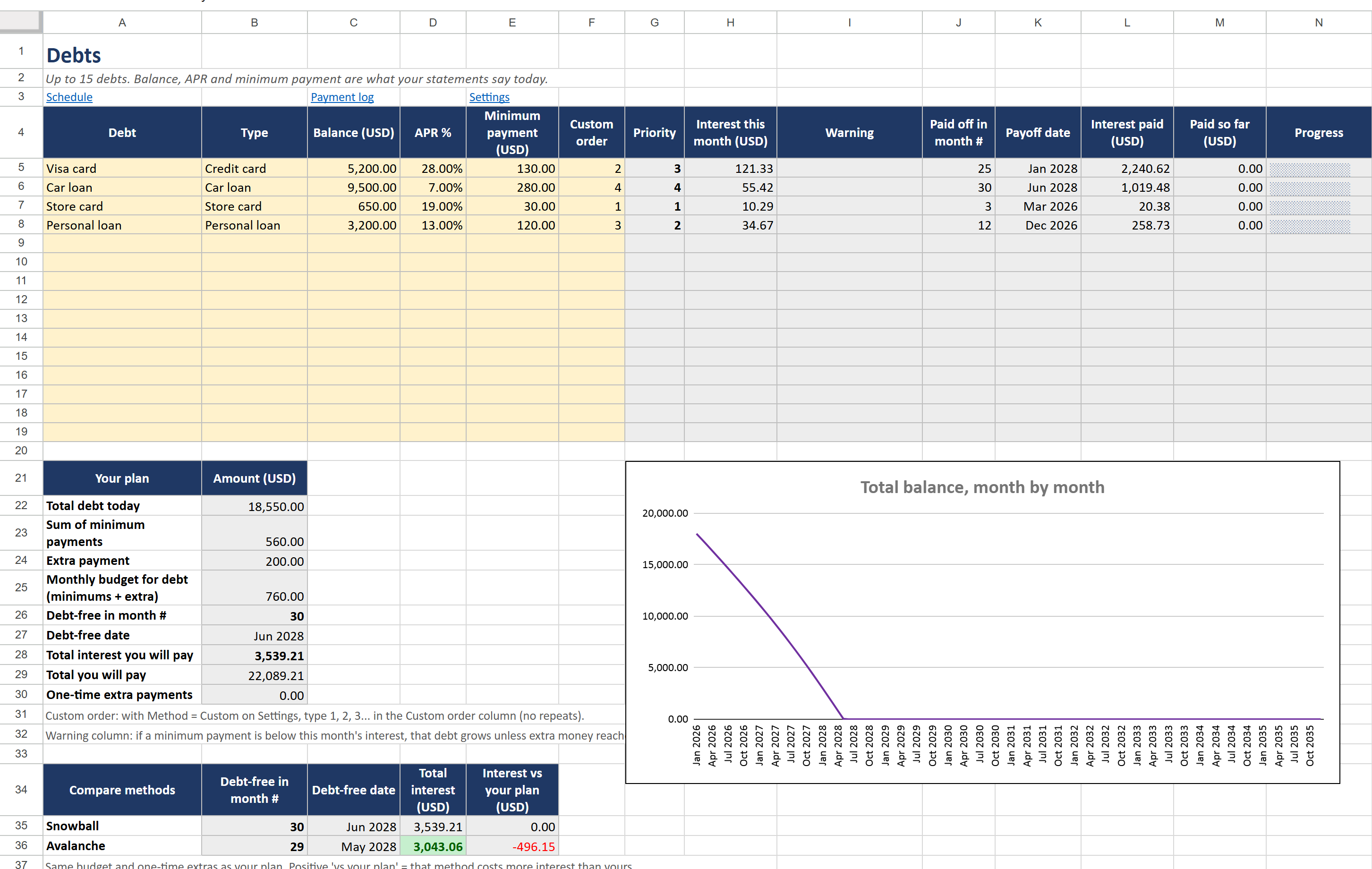
Enter your debts with today's balance, interest rate and minimum payment. The planner builds your month-by-month payoff schedule, compares snowball and avalanche side by side, and shows how much sooner every extra dollar, or a one-time bonus, gets you there.
Launch offer: 30% off with code LAUNCH30 until November 10, 2026. One-time payment, instant download. Secure checkout by Polar.
How the debt snowball works
And when the avalanche is the better choice.
With the debt snowball you pay the minimum on every debt and put every extra dollar on the smallest balance. When it is gone, its minimum joins the extra money and rolls into the next smallest debt, and so on. The payment grows like a snowball, and the quick early wins keep you going.
With the debt avalanche the extra money goes to the highest interest rate first. You pay less interest in total, but the first debt may take longer to disappear. The planner calculates both on your real numbers and puts them side by side, so you see the difference in months and in money before choosing.
- Settings: your currency code, the month you start, the extra amount you can pay each month on top of the minimums, the method (Snowball, Avalanche or Custom) and, optionally, one-time extra payments such as a tax refund or a bonus.
- Debts: up to 15 debts with today's balance, APR and minimum payment. A warning appears if a minimum does not even cover that month's interest.
- Read the result: payoff month and date per debt, interest paid per debt, your debt-free date, the total interest, a balance chart and the Snowball vs Avalanche comparison. Change the extra payment and watch the date move.
- Payment log: record what you really pay. Each debt gets a progress bar, and a debt turns green and struck through when it is paid off.
Can I do this with a blank spreadsheet?
For one debt, yes. For several debts with a rolling payment it gets hard quickly: every month each debt gets its interest and minimum, the money left over has to flow to the next debt in priority order, and a debt that finishes mid-month frees part of a payment. The template does this for 30 years (360 months) and 15 debts, twice more for the comparison, with formulas that work in Excel and Google Sheets in any language.
Free Lite version or full tracker
Start with the Lite version. Upgrade if you have more debts or want to compare methods.
| Lite (free) | Full ($6.99) | |
|---|---|---|
| Debts | Up to 3 | Up to 15 |
| Method | Snowball | Snowball, Avalanche or your own order |
| Snowball vs Avalanche comparison | - | Side by side: debt-free date and interest |
| One-time extra payments (bonus, tax refund) | - | Yes |
| Schedule | 60 months | 360 months (30 years) |
| Progress bars, paid-off debts in green, balance chart | - | Yes |
| Debt-free date and total interest | Yes | Yes, plus interest and payoff date per debt |
| Payment log | - | Yes |
| Google Sheets copy link | Open the .xlsx in Sheets | One click, ready to use |
Questions
Snowball or avalanche: which one should I pick?
If staying motivated is the hard part, snowball. If you only care about paying the least interest, avalanche. The difference is often smaller than people think; the planner shows it on your own debts.
Which Excel versions does it work in?
Microsoft Excel 2010 or newer, on Windows and Mac, in any language and with a decimal point or a decimal comma.
Does it work in Google Sheets?
Yes. The download includes a PDF with a link that makes your own copy in Google Sheets in one click.
Is this financial advice?
No. It is a calculator for the plan you choose. The figures depend on the balances, rates and payments you type.
What do I receive?
A ZIP with two .xlsx files (one with four example debts, one blank) and a PDF with instructions and a Google Sheets copy link for each, right after payment.
Support
Questions or a problem with the file? Write to sebas152000@gmail.com and you will get an answer within one business day. More templates: all HeroBytes templates.